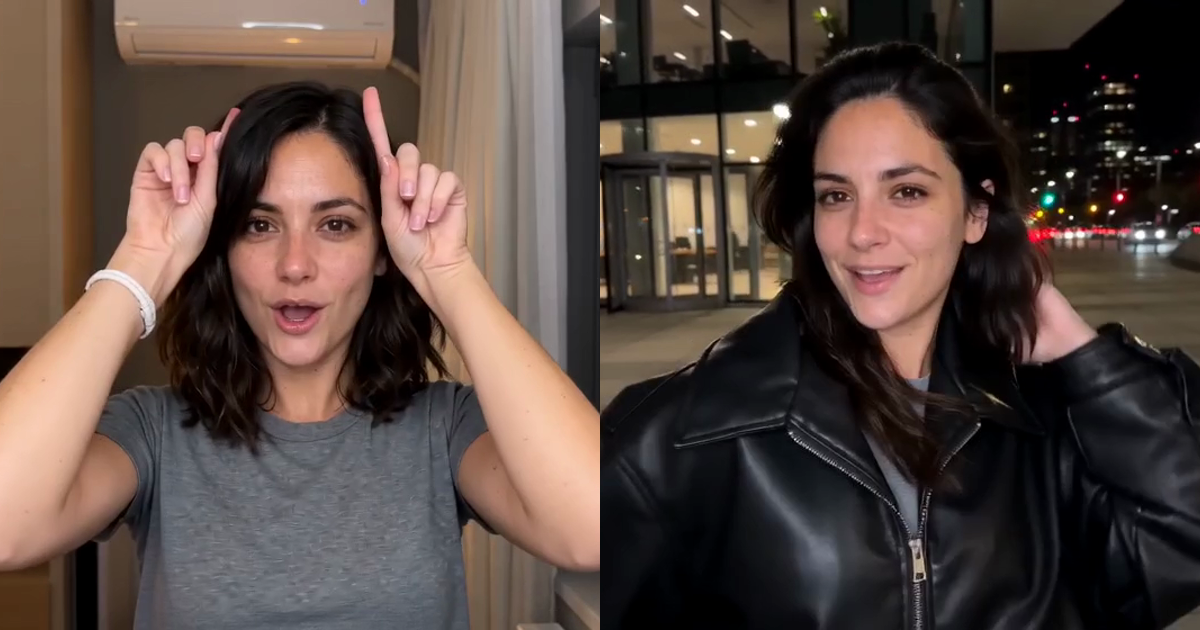
A plain top, a bedroom selfie, little devil horns made with your fingers, two white panels pushed shut on the beat, and then the cut: a night street, an oversized black leather jacket, still mouthing "Prada, Prada, Prada". That's the Devil Wears Prada trend. Here's what it is and how to make your own version from a single photo, without filming the night shot.
Our sample, made from one AI-generated photo on Balanced at 480p. Upload yours and you're the one walking out into the night.
What is the Devil Wears Prada trend?
It's a two-part transition video. You lip-sync at home in a plain top, make little devil horns with your fingers and push two white panels shut on the beat; the hard cut lands you on a night street in an oversized black leather jacket. The joke is the contrast, not the outfit.
The sound is a mashup that KANA DJ (@kaannnaa) posted on September 22, 2026, putting Kai Angel's "Andy Warhol" over "One Desire". The "Prada, Prada, Prada" line everyone mouths comes from it. On October 11, 2026, @kareyka11 posted the home-to-night-street version that most people copy, and the one our template follows. The format took off on Russian-language TikTok and Reels and reached English-speaking feeds in mid-October. You'll see it called the Devil Wears Prada trend, the Prada Prada Prada trend or the Devil Wears Prada transition trend.
What does it have to do with the film?
Only the name. It nods to The Devil Wears Prada, whose sequel came out in 2026 and put the film back in everyone's feed. The trend doesn't recreate any scene from the films, and it isn't the outfit recreations around the sequel either; it borrows the title for a "plain to put-together" glow-up. Our video shows the person from your photo in two generated sets, with no film footage, no actors and no brand logos.
What the template recreates
| Time | Beat |
|---|---|
| 0–5 s | At home: a selfie lip-sync in a warm bedroom, a hand through the hair, finger horns |
| 5–9.3 s | The panels close: two white panels slide in and get pushed shut until only your face shows |
| 9.3–12.5 s | The cut: a night street by a glass office building, leather jacket on |
| 12.5–15 s | Night out: still lip-syncing, a hand over the hair and a pose to finish |
The video follows a depth map of the trend clip, so the horns, the panels and the hard cut land where they do in the original. Your face and hair come from your photo; the jacket is added for the second half.
What you need
- One photo of one adult. Face clearly visible, waist-up or chest-up. A front-facing selfie works best, because the whole clip is filmed like a front-camera video.
- The top you want as your "before". Whatever you wear in the photo is the at-home look. You don't need a photo of a night-out outfit: the jacket goes over that same top after the cut.
- A JPEG, PNG or WebP file up to 20 MB.
No prompt, no editing and no second take.
How to make it, step by step
- Open the Devil Wears Prada template.
- Add your photo.
- Pick a frame. Keep the original's 4:3 frame, or pick vertical 9:16 for full-screen TikTok, Reels and Shorts. The vertical version is framed a little wider. Both cost the same.
- Pick a version and quality (see below), then generate. Your photo is reviewed first, which usually takes a few seconds to a minute or two, and then the video renders in a few minutes. You don't need to keep the tab open: finished clips are saved to Your renders.
- Download or share. You get a 15-second MP4 with the trend sound and no watermark. On a phone you can share it straight to TikTok, Reels or Shorts.
Which version should you pick, and what does it cost?
Both versions render the whole 15-second clip, in either frame. They differ in quality and price:
| Version | 480p | 720p | 1080p |
|---|---|---|---|
| Balanced (Seedance 2.0 Fast) | 15 credits | 25 credits | — |
| Premium (Seedance 2.5) | 30 credits | 60 credits | 105 credits |
- Balanced 480p is where the form starts and the cheapest way to try the trend.
- Premium adds 1080p and the sharpest detail.
- Your first full Premium video at 480p costs just 20 credits instead of 30, so the $9.90 pack (20 credits) covers it.
The price is shown before you generate. Credit packs are one-time purchases, and bigger ones are on the pricing page. If a photo isn't approved or a render fails, the credits come back automatically.
Photo tips
- One person, face to the camera. Crop group shots to the one person you mean.
- Bright, even light. It keeps your face the same in the warm bedroom and on the night street.
- Nothing covering the face. No sunglasses, masks or hands over it: the lip-sync needs your mouth and eyes visible.
- A plain top reads best as the "before". A simple T-shirt or top makes the jump to the leather jacket stand out.
- Your hairstyle comes from your photo. The template is set up to keep its length, colour and texture from the first frame to the last, with your hair looking the same after the cut as before it. It's also told to ignore the original creator's waist-length blonde hair.
- Short hair and guys are welcome. The template is set up to keep short hair, buzz cuts and shaved heads short, and to turn the opening hair flip into a hand brushing over your hair. AI renders can still drift from the photo; a sharp, front-facing photo gives it the best chance.
- Only what's in the photo. Glasses, hats and earrings appear only if your photo has them, and anything you're holding is left out.
- Use photos you're allowed to use. Yourself, or adult friends who agreed to it.
Troubleshooting
My photo was rejected. Photos of celebrities or other public figures don't pass review, so use a photo of yourself or an adult friend who agreed to it. A rejected photo costs nothing: the credits are refunded automatically, and you can try again with another photo.
The render failed. The credits are refunded automatically. Generate again when you're ready.
It's taking a while. Review can take a minute or two, and rendering a few minutes more. You can close the tab; the clip will be waiting in Your renders.
The face or hair doesn't match my photo (for example, short hair came out longer). Renders can drift from the photo. Try again with a sharper, front-facing photo in even light, with nothing covering your face or hair.
FAQ
What song is used in the Devil Wears Prada trend? KANA DJ's mashup of Kai Angel's "Andy Warhol" over "One Desire", known as the "Prada Prada Prada" sound. Your video comes with the sound from the clip it follows; when you post, TikTok or Instagram may match it to the original.
Do I need to film anything? No. One photo is enough for both halves, including the night street.
How long is the video? 15 seconds, as a 4:3 MP4 framed like the original clip or a vertical 9:16 MP4.
Is it a scene from The Devil Wears Prada? No. The trend only borrows the film's name, and our video uses no film footage or actors.
Will my photos be published? No. Your photos and videos are private: we never publish them, show them to other users or use them in our examples or marketing.
Make your Devil Wears Prada video →
apt video ai is an independent tool, not affiliated with or endorsed by 20th Century Studios, the makers of The Devil Wears Prada, Prada, or the trend's creators.
Read more
CapCut Templates vs AI Trend Videos: When a Template Isn't Enough (2026)
CapCut templates, Dreamina prompts and photo-to-trend generators all promise the viral clip. We explain how each works, when each one wins, and which current trends have a CapCut template at all — checked October 14, 2026.
Viral TikTok Trends Your Dog or Cat Can Do With AI (From One Photo)
Four viral video trends that take a photo of your pet instead of a person — the Bad Times argument, the husky version, the Bulin 47 freestyle and the Smalltown Boy scream duo — with what each one looks like, how many photos it needs and what it costs.
How to Make the Bad Times Trend Toddler Video From a Photo of Your Child
The toddler version of the BAD TIMES argument trend, step by step: what the toddler take is, who may upload a child's photo, which photo works, privacy, and what it costs.